Document Work Story

Capture how the assignment came together, not just the final answer.

Mark helps instructors ask a better question than "Was AI involved?" It helps show whether students worked through the assignment in a way you can review.

Process over panic

Better evidence than a black-box AI score

Code
Recorded change activity
Writing
Progress over time
Math
Steps and explanations
Mark does not need to claim it can perfectly detect AI. It helps instructors see whether the student can account for the submitted work.

How students use Mark

For assignments where process matters, Mark gives students a focused workspace that creates a record over time.

1

Students work in Mark

Students complete the assignment in a focused workspace for code, writing, math, or other process-heavy work.

2

Progress is saved over time

Mark autosaves as students work. External paste and drag-and-drop are blocked, while students can reuse material copied within the Mark editor.

3

Instructors review the record

Instructors can preview read-only saved versions from the student's live Mark workspace for context. The downloaded assignment ZIP carries the current documents, participant-usable copies, and a signed, frozen work story for submission through an LMS.

Inside the instructor view

See the workspace at a glance, then review one student's recorded development.

In this simulated CPU Scheduling Lab, the workspace report identifies which students have started and which have changed-content history. An instructor can then open a student's Work Story for the timing, files, and estimated changes behind the summary.

Simulated demonstration data
8 change markers
3 documents
5 approximate periods
3 UTC days
01

Workspace progress

See who has started, who has changed-content history, and who may need support before the deadline.
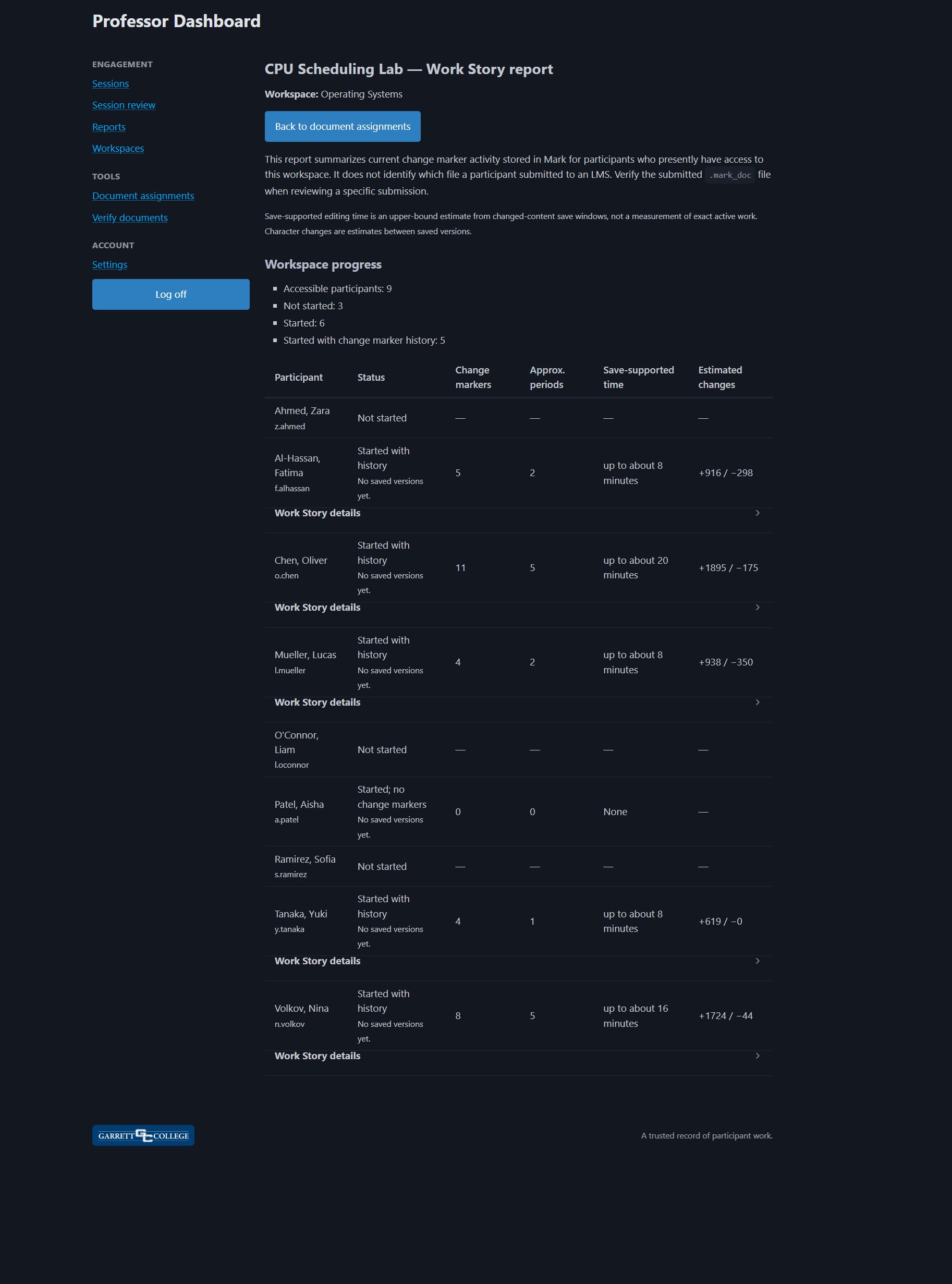
Workspace Work Story report showing progress and change marker summaries for a simulated participant list
Current assignment activity across students with workspace access. Open full report
02

Nina's Work Story

Move from the summary into a neutral, document-by-document development record.
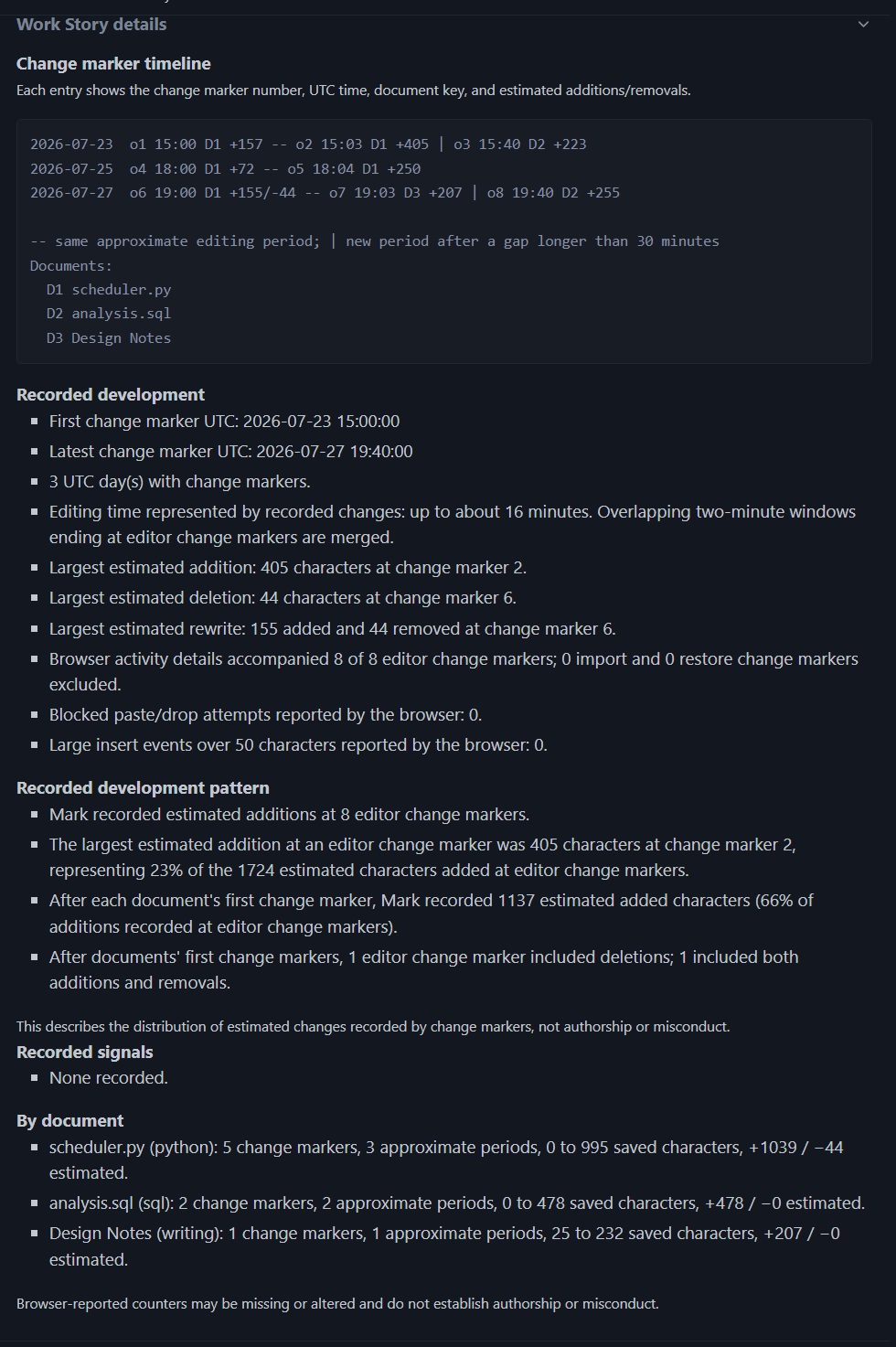
Simulated participant Work Story showing eight change markers across Python, SQL, and writing documents
Saved development across Python, SQL, and design notes. Open full detail
Context without a verdict. The largest estimated addition at a change marker represented 23% of Nina's additions, while 66% appeared after each document's first change marker. Mark reports that distribution without claiming it proves authorship or misconduct.
How to read a Work Story

Useful evidence starts with understandable measurements.

Change markers Changed-content saves received by Mark, not keystrokes or complete revisions.
Approximate editing periods Groups of change markers separated by gaps longer than 30 minutes, not exact working sessions.
Save-supported editing time Time represented by changed-save windows, not the student's total active working time.
Estimated changes Comparisons between consecutive saved versions, not counts of manually typed characters.

The instructor defines the process expected for the assignment. Mark does not decide what a normal process looks like; it provides recorded development for comparison with the assignment's intended workflow.

Records instructors can actually use

The AI-era assignment problem looks different across disciplines, but the teaching need is the same: evidence of process.

Code assignments

Review change marker timing and change patterns alongside the submitted code.

Writing assignments

Review saved progress patterns alongside the submitted writing and any reflection the assignment requests.

Math work

Review submitted steps and explanations alongside change marker activity.

Shared visibility

Students can inspect the same underlying work story while instructors can review current progress across a workspace assignment.

Reviewable records

Freeze the document work story into the signed internal record inside the assignment package so the exported work story remains understandable and portable.

Better habits

Shift incentives toward steady work and reflection instead of last-minute answer gathering.

Built to avoid overclaiming

AI detection tools can create false confidence and difficult student conversations. Mark focuses on process evidence that instructors can interpret in context.

Not a magic verdict Supports instructor judgment instead of replacing it.
Works across assignment types Useful for code, writing, math, and other process-heavy work.
Designed for fairness Gives students access to their own work story and keeps ambiguous browser signals separate from server records.

FAQ

Do students need to install anything?
No. Students only need a browser and internet access.
What do students use?
Students select an available assignment within a Mark workspace and work in its focused editor. Progress is saved over time, external paste and drag-and-drop are blocked, and students can inspect their own work story.
What does the instructor review?
Instructors can review current progress across a workspace assignment and preview read-only saved versions from the live Mark workspace. Live history provides context but does not identify which version was submitted to an LMS. A submitted assignment ZIP contains the current documents, participant-usable copies, and a signed internal record with a frozen work story covering save-supported editing time, approximate editing periods, per-document development, saved-change estimates, and chronological change markers. Browser-reported editor activity is labeled separately and is not treated as proof of authorship or misconduct. The goal is to understand how the assignment came together, not only whether the final answer looks correct.
Does Mark measure exact active working time?
No. Mark reports an upper-bound estimate of editing represented by changed-content saves. It merges overlapping two-minute autosave windows, excludes assignment-package and version-history restores as well as time between those windows, and labels the result as save-supported editing time rather than exact active work.
Is this AI detection?
No. Mark does not need to claim it can perfectly detect AI. It creates process records that help instructors interpret student work in context.

Need a clearer record of student work?

Tell us what kind of assignments you use and what makes reviewing student work feel uncertain.

Request a pilot demo