Verify class engagement across courses without a heavy rollout.
Built for programs and instructors who need reviewable engagement records alongside existing classes and recordings, without LMS bloat or a complicated central rollout.
- Built around the way you already teach
- Useful for in-person, remote, hybrid, and recorded sessions
- Designed to support fair engagement review and documentation
A simple engagement record you can trust
How it works
The goal is a fair record with minimal friction for you and your students.
Add engagement prompts during class or import a timed list
Instructors can add prompts live at natural points in a session or import prompts with video offsets for an existing recording. Timed import makes recorded material reusable without editing the video or manually rebuilding the prompt timing during playback.
Students enter responses as prompts occur
Students enter short matching responses in Mark as prompts are presented during the class session or recording. They move forward through the prompt sequence at roughly the same pace, and missing one does not prevent them from continuing with a later prompt.
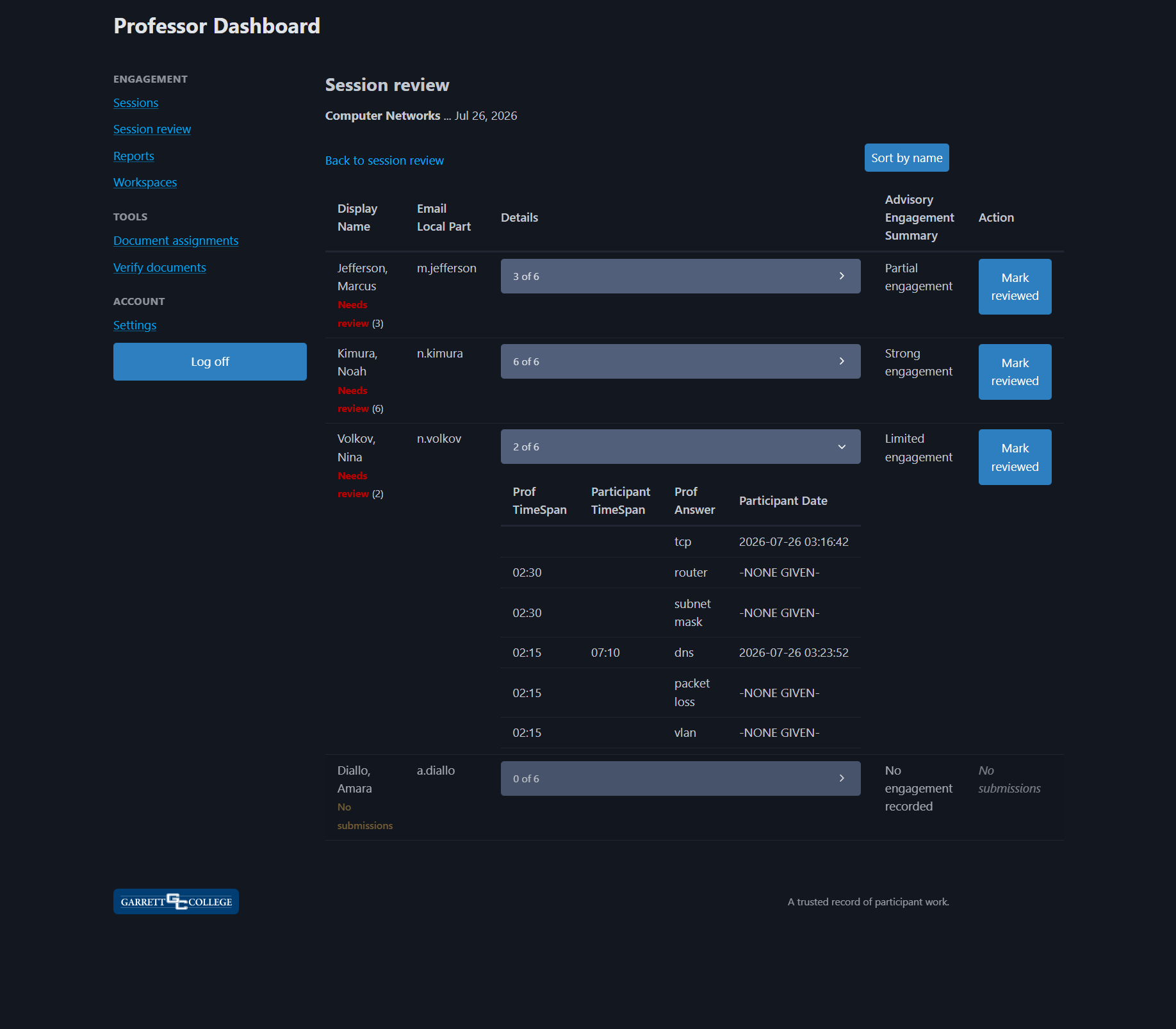
Review engagement and document participation
Review prompts, responses, and timing, see advisory engagement summaries, mark records reviewed, and export a workspace summary when needed.
Why engagement prompts work
Mark is not tied to your LMS or video platform. It creates a lightweight record of prompt responses and timing around the session for instructors to interpret in context.
From passive viewing to a reviewable engagement record
A recorded lecture alone does not establish Regular and Substantive Interaction. Under federal distance-education rules, RSI is evaluated across a course or competency and depends on meaningful instructor involvement, predictable opportunities for interaction, monitoring of student engagement, and proactive follow-up when needed.
Mark lets instructors create or import a timed sequence of prompts to use alongside a recording. Students submit short matching responses as those prompts are presented. After a student's first accepted response, sequence and pacing rules limit how quickly the student can move through the remaining prompt timeline.
This gives each use of an existing recording its own student-specific response and timing record without requiring the instructor to edit or re-record the video. Mark provides participation patterns that instructors can review and use to inform follow-up.
Used with instructor review and follow-up as part of an institution-designed course process, Mark's session records can support engagement monitoring and RSI documentation. Mark does not award credit or determine whether RSI or any other regulatory requirement has been satisfied.
Features, without the fluff
Instructor-first
Fast to use during real teaching, with no complex setup and low admin overhead.
Clear, reviewable engagement records
Designed to support fair, informed review when participation and viewing matter.
Simple reporting
Per-session, per-student, and per-workspace summaries, plus export when you need it.
Works alongside your LMS
Keep teaching the way you teach while filling the "did they engage?" gap.
Privacy-respecting by design
Built to provide reasonable records without turning class into surveillance.
Easy to evaluate
Start with a conversation about your courses, workflow, and whether Mark provides the information your program needs.
Start with fit
Mark is easiest to evaluate when we understand your courses, sections, class sizes, and the records your program needs for fair, informed engagement review.
- Your current engagement or video workflow
- How students would access Mark
- What instructors can review per session
- What exports or records your courses need
- Department, program, or multi-section pilot needs
If Mark fits, we can talk through the right pilot setup for your context.
Who this is for
- Face to face, online, or hybrid programs
- Programs using Teams, Zoom, Panopto, Kaltura, or other hosted recordings
- Courses where participation matters
- Departments that need consistent engagement records across sections
Who this is not for
- Proctoring and high-stakes surveillance
- Institutions shopping for an LMS replacement
- People who want 50 analytics dashboards